Signal Generator Client
The signal generator can be used to generate various signals including:
- Sine wave
- Square wave
- Triangle wave
- Random walk
Below is a screen-shot of the generated data displayed in Grafana.
Configuration
The signal generated can be configured with the following parameters:
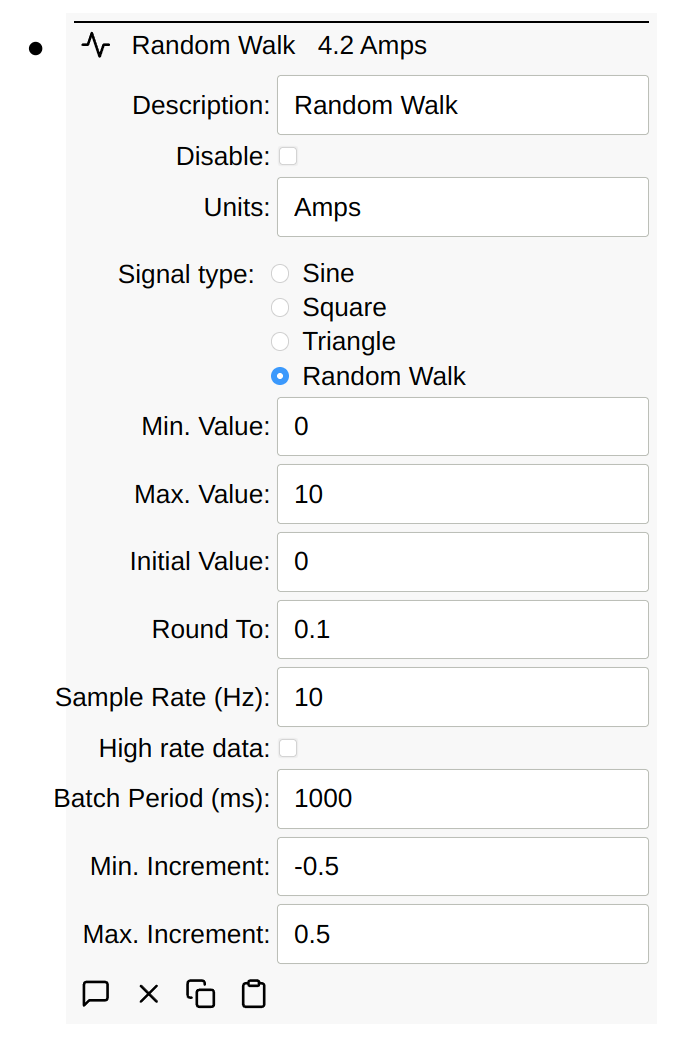
Most of the parameters are self-explanatory. With a Random Walk, you typically need to enter a negative number for the minimum. Increment as shown above. This causes the negative number generated to be negative roughly half the time.
The rounding can also be used to generate binary signals. Imagine a signal generator with these settings:
Max. value= 1Min. value= 0Initial value= 0Round to= 1Min. increment= -7Max. increment= 3Sample Rate= 20 milliseconds
Due to min/max/round to options, this is a binary value, either 0 or 1, biased
toward 0 (due to min/max increment options). This could be useful for
simulating binary switches or something like it. Effectively, this will hold the
value for at least 20m and picks a random number between -7 and 3. Due to
rounding, if value is currently 0, there’s a 25% chance it becomes 1. If 1,
there’s a 65% chance it becomes 0. This means that the value will be 0 roughly
91.25% (= 75% + (1 - 75%) * 65%) of the time.
Schema
signalType is sine, square, triangle, or random walk. frequency
applies to the three waveforms and minIncrement, maxIncrement, and roundTo
apply to a random walk. sampleRate is in Hz and batchPeriod is in
milliseconds.
A generator writes to itself unless it is told otherwise. A node configured to
write elsewhere carries a destination mapping, whose keys are nodeID,
parent, highRate, pointType, and pointKey. nodeID there is a key
rather than a point type, so it is written as the ID of the node it names rather
than as a description, which is worth knowing when moving a generator between
instances. The destination has to be the generator’s parent or a node below it;
a generator that names a node elsewhere in the tree does not run, and the reason
is shown as an error on its node.
Below is an export of several types of signal generator nodes:
nodes:
  - signalGenerator:
      batchPeriod: 1000
      description: Variable pulse width
      frequency: 1
      initialValue: "0"
      maxIncrement: 3
      maxValue: 1
      minIncrement: -7
      minValue: "0"
      roundTo: 1
      sampleRate: 5
      signalType: random walk
      units: Amps
      value: 1
  - signalGenerator:
      batchPeriod: 1000
      description: Triangle
      frequency: 1
      initialValue: "0"
      maxIncrement: 0.5
      maxValue: 10
      minIncrement: 0.1
      minValue: "0"
      sampleRate: 100
      signalType: triangle
      value: 6.465714272450723e-12
  - signalGenerator:
      batchPeriod: 1000
      description: Square
      frequency: 1
      initialValue: "0"
      maxValue: 10
      minValue: "0"
      sampleRate: 100
      signalType: square
      value: 10
  - signalGenerator:
      batchPeriod: 1000
      description: Sine
      frequency: 1
      initialValue: "0"
      maxValue: 10
      minValue: "0"
      sampleRate: 100
      signalType: sine
      value: 4.999999999989843
  - signalGenerator:
      batchPeriod: 1000
      description: Random Walk
      frequency: 1
      initialValue: "0"
      maxIncrement: 0.5
      maxValue: 10
      minIncrement: -0.5
      minValue: "0"
      roundTo: 0.1
      sampleRate: 10
      signalType: random walk
      units: Amps
      value: 9.1