MCU Devices
Microcontroller (MCU) devices can be connected to Simple IoT systems via various serial transports (RS232, RS485, CAN, and USB Serial). The Arduino platform is one example of an MCU platform that is easy to use and program. Simple IoT provides a serial interface module that can be used to interface with these systems. The combination of a laptop or a Raspberry PI makes a useful lab device for monitoring analog and digital signals. Data can be logged to InfluxDB and viewed in the InfluxDB Web UI or Grafana. This concept can be scaled into products where you might have a Linux MPU handling data/connectivity and a MCU doing real-time control.
See the Serial reference documentation for more technical details on this client.
File Download
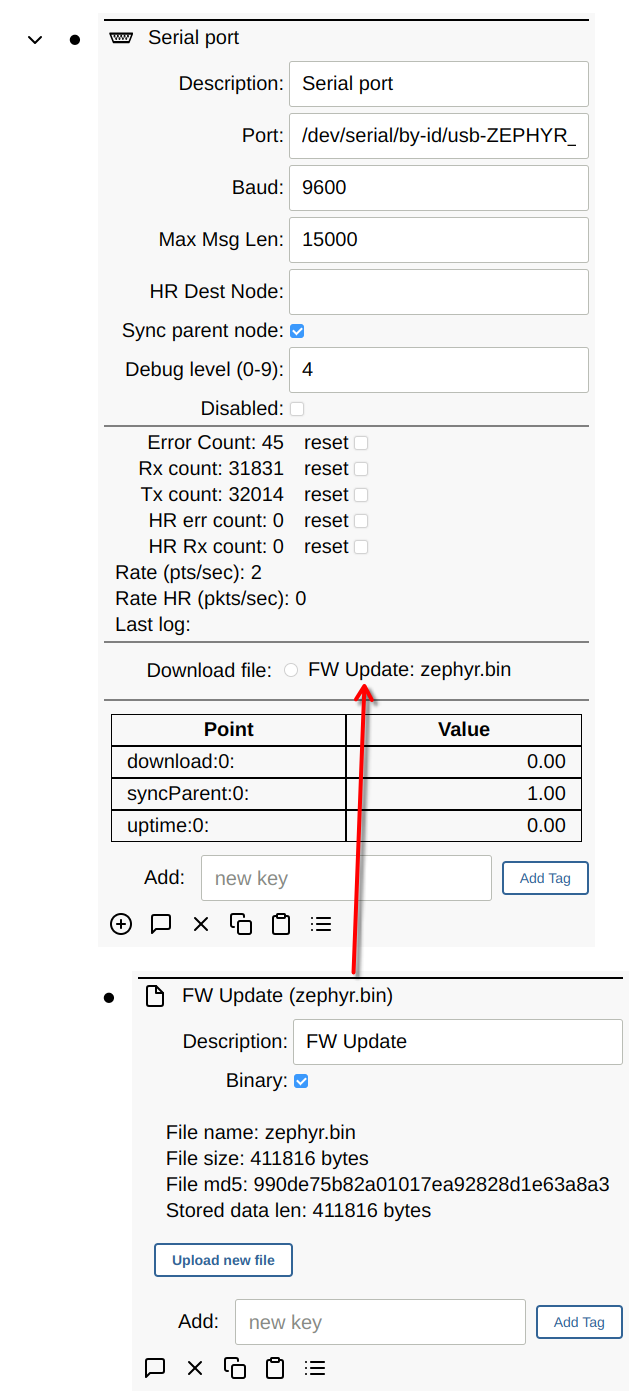
Files (or larger chunks of data) can be downloaded to the MCU by adding a File node to the serial node. Any child File node will then show up as a download option.
Protocols
The serial client speaks two wire protocols, selected with the Protocol setting on the node.
Binary is the default and is what existing nodes use. Points are exchanged as COBS-framed packets with a sequence number and a CRC. It is compact, and it supports high-rate data and file transfer. See the Serial reference documentation for the packet format.
Zephyr shell exchanges points as lines of ASCII over an MCU’s console shell. Everything on the wire is readable, so the same link you use for debugging is the link Simple IoT uses for data. Choose this when your firmware already has a Zephyr shell, or when bringing up a new board where being able to see and type on the link matters more than efficiency.
An empty Protocol value means binary, so nodes created before shell mode existed keep working unchanged.
Shell protocol
The MCU emits each point as a line, and Simple IoT writes points back using the
p command the Zephyr firmware already registers:
pt uptime 0 INT 3600                              MCU to Simple IoT
p description 0 STR "lab bench" 2026-07-31T12:00:00.000000000Z
Both directions use the same fields and differ only in the verb, so an emitted line becomes a replayable command by changing one character. The verbs differ deliberately: Simple IoT must never mistake an echoed command for a point report.
Anything on the console that is not a point line is tolerated. Zephyr log
messages become log points, and the boot banner, shell prompt, and command
output are ignored rather than counted as errors.
High-rate data, File node downloads, and packet acknowledgement are not available in shell mode, and the UI hides those controls when it is selected. Nodes that need them should stay on the binary protocol. Shell mode can update the MCU firmware instead; see Firmware update.
Timeout is how many seconds the link may be silent before the node is marked not connected, defaulting to 60. An open serial port says nothing about whether anything is alive on the other end, particularly on a USB port that survives an MCU reset.
Firmware update
In shell mode, Simple IoT can install new MCU firmware over the same serial link. The MCU runs MCUboot and mcumgr (SMP) over its shell, and the image ships as a file in the Linux OS update.
Firmware image (firmwarePath) is the absolute path of a signed MCUboot
image, such as /lib/firmware/mcu.signed.bin. Leave it empty to turn the
feature off. Simple IoT checks the image when the MCU connects, when the path or
the file changes, and when the MCU reports new version points. It uploads the
image only when:
- the MCU reports
fwVersion, so firmware without update support is left alone - the image version is newer than
fwVersion, compared as numbers (major, minor, revision, build); an equal or older image is never sent - the image is not already staged, with
fwPending1 andfwStagedVersionequal to the image version
The image goes to the MCU’s second slot and is marked for test. The MCU decides
when to apply it, and Simple IoT never resets the MCU. Apply firmware now
writes fwApply 1 to ask the MCU to apply a pending image right away. When the
MCU acknowledges with fwApply 0, Simple IoT shuts this system down
(systemctl poweroff); the MCU installs the image during its power-down
sequence and powers the system back on. With no image pending, the request does
nothing. The button takes effect immediately; there is no Save step.
Auto apply firmware (fwAutoApply) applies each newly staged image right
away, as if Apply firmware now were pressed when the upload finishes. Use it
when MCU updates should not wait for the next power-off, for example to finish
an OS update in one restart.
Each image is uploaded at most once while Simple IoT runs. If the MCU later
reports the old version with nothing pending, because MCUboot reverted or
rejected the image, Simple IoT reports this in the error point and does not
upload the image again until the file changes or Simple IoT restarts.
The firmware update uses these points, all with key 0:
| Point | Type | Direction | Meaning |
|---|---|---|---|
fwVersion | STR | MCU to SIOT | running image, M.m.r, with .b when build is not 0 |
fwStagedVersion | STR | MCU to SIOT | image waiting to be applied, or none |
fwPending | INT | MCU to SIOT | 1 when an image waits to be applied |
fwApply | INT | SIOT to MCU | 1 asks the MCU to apply the pending image now |
fwApply | INT | MCU to SIOT | 0 acknowledges a request; SIOT then shuts down if one was pending |
The node’s progress point shows the upload in percent. A file that is not a
valid MCUboot image, or an upload the MCU does not complete, is reported in the
node’s error point, and a failed upload is tried again after 5 minutes.
Once the MCU reports fwVersion, the serial node shows the update state below
the Firmware image field:
- Running firmware is the version the MCU runs now.
- Staged firmware is the version waiting to be applied, or
none, followed by(pending)while it waits. - Firmware upload shows the percentage while an upload runs.
- Apply firmware now appears while an image is pending.
- Auto apply firmware sets
fwAutoApply; applying restarts the system. - Error shows the node’s
errorpoint when it is set, in either protocol.
The serial protocol reference describes how the image travels over the console.
What the MCU firmware must do
Simple IoT handles the upload; applying the image is up to the firmware. To work with Simple IoT, the firmware:
- reports
fwVersion,fwStagedVersion, andfwPendingwhen they change, and repeats them now and then (every 60 seconds, for example), since a report stamped while the system clock is wrong can be kept as stale - reports
fwStagedVersionasnonewhen nothing waits to be applied, such as the previous image MCUboot keeps after a swap - answers every
fwApply1 withfwApply0, which also clears the request on the Simple IoT side so it is not sent again after a reconnect - ignores
fwApplywhen no image is pending, apart from the acknowledgment - installs a pending image when the system it powers is off, for example by
rebooting into MCUboot at the end of its power-down sequence, and powers the
system back on afterward when the install was requested with
fwApply - confirms a new image itself once it runs correctly, so MCUboot reverts an image that fails; Simple IoT never confirms or resets the MCU
Log Console Output
Log console output mirrors every line the MCU prints to the Simple IoT server log, tagged with the node description. Shell protocol only.
Once Simple IoT holds the serial port nothing else can read it, so this is what keeps the board observable. It works headless, lands in the journal when Simple IoT runs under systemd, and lets you watch a board boot in the terminal you started the server in. With it on, a separate terminal program is only needed before a node is attached to the port at all.
It is deliberately not a debug level: watching a board boot and diagnosing why a point is not arriving are different questions, and a single verbosity dial would force one to imply the other. Expect it to be loud on a board with network logging enabled.
Debug Levels
You can set the following debug levels to log information.
Binary protocol:
- 0: no debug information
- 1: log ASCII strings (must be COBS wrapped) (typically used for debugging code on the MCU)
- 4: log points received or sent to the MCU
- 8: log cobs decoded data (must be COBS wrapped)
- 9: log raw serial data received (pre-COBS)
Shell protocol:
- 0: no debug information
- 2: log malformed point lines, oversize lines, malformed SMP frames, warnings about points the MCU will truncate, and why a firmware image was not sent
- 4: log points decoded, each
pcommand written to the MCU, and each SMP request and response - 9: log raw serial data received, before line assembly
Level 1 has no shell-mode meaning; console output is the separate checkbox described above, so the two can be used independently.
Schema
The configuration of a serial node using the shell protocol, with a file node available for download to the MCU:
nodes:
  - serialDev:
      baud: "115200"
      debug: 0
      description: Lab bench
      disabled: 0
      firmwarePath: /lib/firmware/mcu.signed.bin
      fwAutoApply: 0
      logConsole: 1
      maxMessageLength: 1024
      port: /dev/ttyACM0
      protocol: shell
      syncParent: 0
      timeout: 60
      children:
        - file:
            binary: 1
            data: SGVsbG8sIE1DVQ==
            description: Calibration table
            name: cal.bin
port and baud are text, so both are quoted. protocol is binary or
shell, and an empty value means binary, so nodes created before shell mode
existed carry no protocol point at all.
timeout is in seconds and maxMessageLength in bytes. logConsole applies to
the shell protocol alone.
The counts, the connection state, the uptime, and the log line shown in the UI are points the client maintains, so an export of a running node carries them as well.
A node sending high rate data also carries an hrDest point holding the ID of
the destination node. Unlike a point of type nodeID, it is written as the ID
rather than as a description, so it names a node in the instance it was exported
from. The destination has to be the serial node’s parent or a node below it; a
destination elsewhere in the tree is refused, high rate data is dropped until it
is fixed, and the reason is recorded as an error point on the serial node.
Zephyr Examples
The zephyr-siot repository contains examples of MCU firmware that can interface with Simple IoT over serial, USB, and Network connections. This is a work in progress and is not complete.
Arduino Examples (no longer maintained)
Several Arduino examples are available that can be used to demonstrate this functionality.